
A tool for photographers · v1.4

EXIF Overlay Tool

Stamp camera data, your way.

A lightweight Windows utility that stamps EXIF data directly onto your photograph — camera, lens, shutter, aperture and more. Pick what you want, where it sits, how it looks.
15 EXIF fields Live preview Batch processing Non-destructive
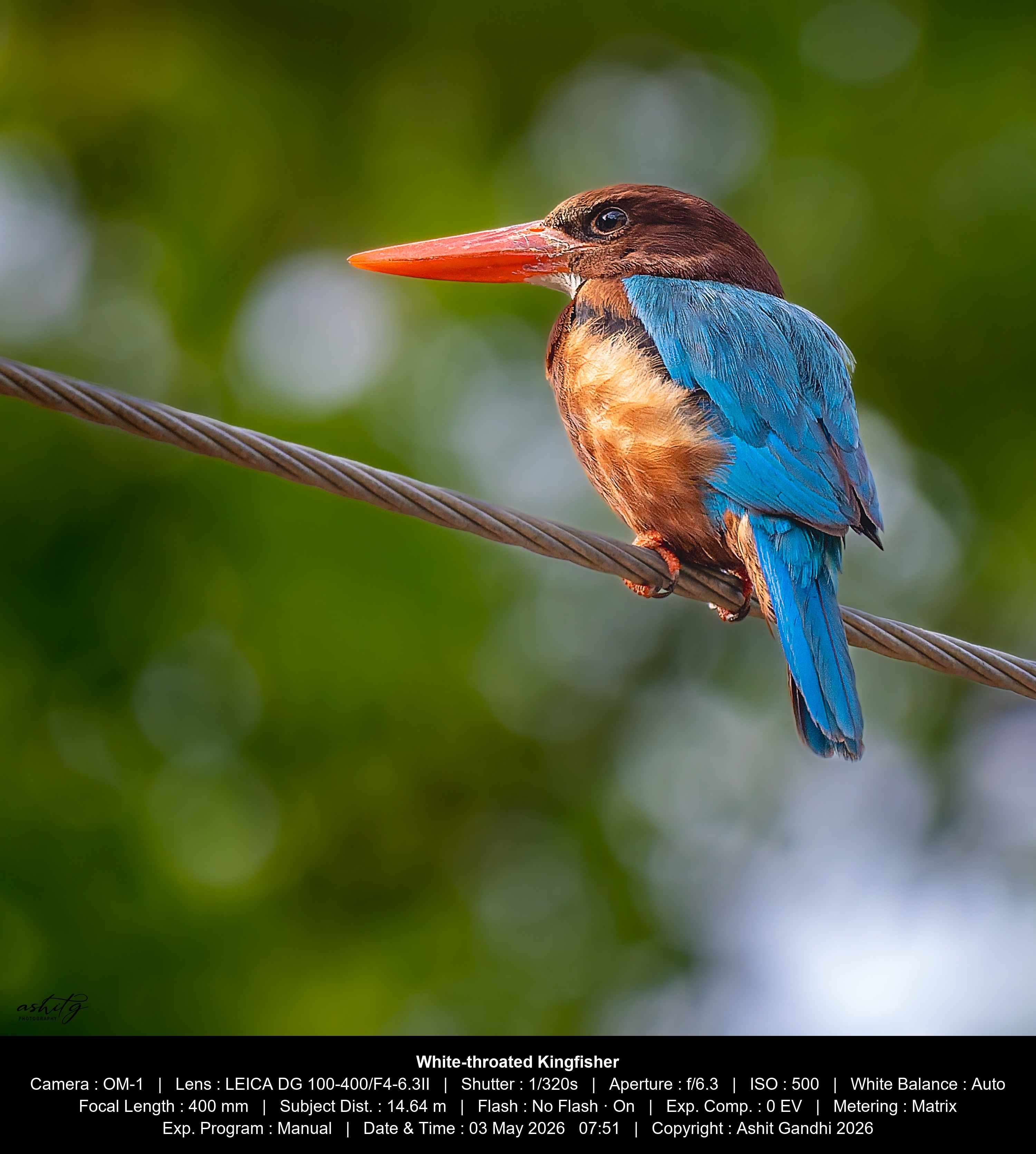
White-throated Kingfisher — actual EXIF overlay output
Actual Output

Actual output · Single Line Caption · Fully Customizable

A small tool that does exactly what photographers ask of it.

No subscriptions, no upload-to-cloud, no compression. Open a photo, pick your overlay, export.

15 EXIF fields — Camera, Lens, Shutter, Aperture, ISO, Focal Length, White Balance, Flash, Metering, Date & Time, GPS, Copyright and more
Single line or multi-line — one strip at the top or bottom, or all four corners
Field labels on or off — show “Shutter : 1/320s” or just the values
Notes — add a custom caption (up to 2 lines) stamped alongside the data
Single Line Caption (Black Bar) — a clean black-bar strip with white caption text across the image
Text colour — White, Yellow or Black to suit any background
Destination folder — choose exactly where stamped images are saved
Batch processing — stamp a whole folder in one click, with uniform or per-image settings

Process a whole folder in one click.

Whether you're sharing a single hero shot or exporting an entire session, the batch engine handles it.

Apply to all — configure your overlay once and point it at a folder; every photo gets the same treatment in one click
Per-image settings — step through each image and dial in exactly what each shot needs: fields, position, colour and size
Unlimited photos — no cap on folder size; the tool runs through every image without slowing down
Always non-destructive — originals stay untouched; each stamped file is written as a fresh _exif copy

Pick from 15 EXIF fields, in any combination.

Tick what matters for the shot, untick what doesn't. The tool remembers your favourites across sessions.

Camera
Lens
Shutter Speed
Aperture
ISO
White Balance
Focal Length
Subject Distance
Flash
Exposure Compensation
Metering Mode
Exposure Program
Date & Time
Copyright
GPS Location

Made by a photographer,
not a developer.

Free No cost, no subscription, no Pro tier. Just download and use it.

I shoot with an Olympus OM-1 and share a lot of work online. I always wanted the camera settings visible on the photo — not buried in the metadata, but actually on the image.

Every solution I found was either too complex or required paying for software that did a hundred other things I didn't need. So I built something small that does one thing well.

A few photographer friends asked for it. So I'm putting it out for free — for anyone who finds it useful.

See my photography work Buy me a coffee
"I'm not a software developer. I just needed a tool that didn't exist the way I wanted it — so I made one. If it helps other photographers too, that's reason enough to share it."
ashitg Photography
Ashit Gandhi
Photographer · studio.ashitgphotography.com

A small EXE, built with care.

A · What's in the file

Nothing but the tool itself.

  • No background services or scheduled tasks
  • No telemetry, analytics, or internet access required
  • No registry changes outside its own preferences
  • Uninstall by deleting the file — that's it
B · How you can verify

Don't take my word — check it yourself.

  • SHA-256 hash published next to the download — match it against the file you saved
  • VirusTotal report linked on the download card — 60+ AV engines scan it for you
  • Block your firewall — the tool works fully offline; it never needs the network

About the Windows SmartScreen warning

Windows shows a blue SmartScreen dialog the first time it sees a new EXE from a small publisher. Click More info then Run anyway — you'll only need to do this once.

Step 01
Windows protected your PCMicrosoft Defender SmartScreen prevented an unrecognised app from starting.

You'll see this dialog

A one-time prompt the first time Windows encounters the app.

Step 02
More infoClick the small More info link — a Run anyway button will appear.

Click “More info”

The Run anyway button is hidden until you click this.

Step 03
Run anyway[ Run anyway ]   [ Don't run ]

Click “Run anyway”

After this, Windows recognises the file and opens it directly every time.

What photographers are saying.

Real feedback from people who've downloaded and used the tool.

Loading comments…

Share your experience →

Thanks! Your comment has been posted.
Something went wrong. Please try again.

Download EXIF Overlay.

A small standalone executable for Windows 10 and 11. No installer, no admin rights, no account.

EXE
EXIFOverlayTool.exe
v1.4 · 15.42 MB · Windows 10 / 11
SHA-256
084BB6FC5F0398F41093C064415148C64194626741E3FA6E605EA169296283F5
Signed download — direct from this site only VirusTotal report — 7/69 flagged (false positive) No installer, no admin rights required
Download v1.4
Chrome users: If Chrome shows "Abort" or a warning, click "Keep" or "Keep anyway" to proceed. Verify using the SHA-256 hash or VirusTotal link above.
Windows users: If the blue “Windows protected your PC” screen appears, click More info → Run anyway — once only. If Defender blocks it, go to Windows Security → Virus & threat protectionProtection historyAllow
VirusTotal: 7 / 69 engines flagged this file. Known false positive with Nuitka-compiled executables. The remaining 62 engines, including all major vendors, report no threat.
View full VirusTotal report →

Get notified about new versions

Just version updates, no spam.

Stored privately — never shared, never sold.

Buy me a coffee

This tool is free — no ads, no accounts, always will be. Built by one photographer in spare evenings. If it's saved you time, a small tip means a lot.

Support via Topmate
One-off · Secure · Optional

See Safety & Trust for the SmartScreen walk-through

Download for macOS.

Universal build for Intel and Apple Silicon. No installer — just extract and run.

APP
EXIF Overlay Tool.app
v1.4 (Universal) · 19.94 MB · ZIP file
SHA-256
B9164A2D1799FA04763B5B509083B586C9756F54D845740C0F0BA976FAD66033
macOS 11 (Big Sur) or later Intel Macs (2015–2020) Apple Silicon M1, M2, M3, M4
Download for Mac — v1.4 (Universal)

First Launch — macOS Security

macOS Gatekeeper blocks unsigned apps on first launch. Use any one of these methods to allow it — after that, it opens normally every time.

Method 1 Right-click to Open Recommended
  1. Double-click the ZIP to extract it
  2. Right-click EXIF Overlay Tool.appOpen
  3. Click Open on the security dialog
  4. From second launch onwards, double-click opens normally
Method 2 System Settings Easiest
  1. Try to open the app — macOS will block it
  2. Go to System Settings → Privacy & Security
  3. Scroll down — you’ll see “EXIF Overlay Tool was blocked”
  4. Click Open Anyway → enter your Mac password → opens
Method 3 Terminal Most reliable

Run this command once in Terminal, replacing the path with where you saved the app:

xattr -cr "/path/to/EXIF Overlay Tool.app"

After running this command, the app opens normally on double-click — no security dialog.

Apple has not verified this app. Right-click → Open bypasses Gatekeeper safely. For company-managed Macs, contact your IT administrator.

Now inside Lightroom Classic.

Stamp EXIF overlays without leaving Lightroom Classic — straight from the Plug-in Extras menu.

  1. Download the .lrplugin zip and extract it.
  2. Open Lightroom Classic.
  3. Go to File → Plug-in Manager.
  4. Click Add (bottom-left).
  5. Select the extracted .lrplugin folder.
  6. Click Done.
  7. Find it under File → Plug-in Extras.
Lightroom Classic

Get the plugin

Same engine, same non-destructive exports.

Download plugin (.zip)
Plugin v1.0 · ZIP archive

Note: Keep the EXE in the same folder as the LRPlugin folder. Lightroom Classic only.

Version History

v1.4 Current
  • Settings Memory — app remembers your last used layout, position, font, colour & field selection and restores them on next launch
  • Custom Notes Font — choose any system font for Notes text, independent of the EXIF data font
  • All Fields Saved — individual EXIF field selections (Camera, Lens, ISO etc.) saved and restored on next launch
  • Per-image Notes — assign a different custom note to each image in a batch, without changing your EXIF overlay settings
v1.3 Previous
  • Universal Windows build — installs on any Windows 10 / 11 PC, Intel or AMD Ryzen
  • Refreshed layout — redesigned interface for a clearer, faster workflow
  • Lightroom Classic plugin — stamp overlays without leaving Lightroom
v1.2 Previous
  • Single Line Caption (Black Bar) — clean black-bar strip with white caption text
  • Data overlay in a single line (top or bottom) or multiple lines (all 4 corners)
  • Data displayed with or without field labels
  • Notes section — add a custom note (max 2 lines) to your overlay
  • Destination folder — choose where stamped images are saved
v1.0 Initial release
  • 15 EXIF fields selectable
  • Multi-line overlay at all 4 corners
  • Text colour: White, Yellow, or Black
  • Font size control
  • Batch processing across folders